Climb
With a route, the Climb page tells you what’s left of the climb you’re on: the distance and the ascent to the top, the grade right now and the average grade of what’s left. Between one climb and the next, it shows you the next one.
What it shows
On a climb:
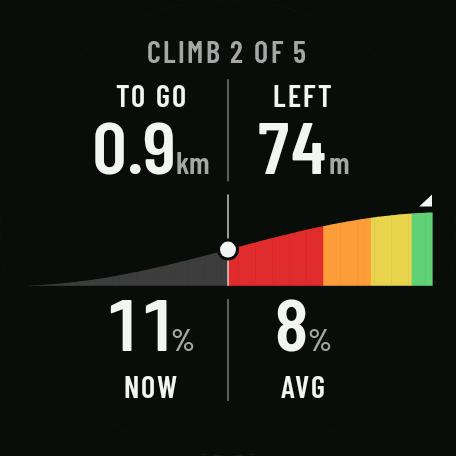
- At the top, the counter: CLIMB 2 OF 5 (the one you’re on and how many the route has).
- Below it, TO GO, the distance to the top, and LEFT, the ascent you still have to do.
- In the middle, the climb’s profile, colored by grade: green under 3%, yellow from 3%, orange from 6%, red from 9% and maroon from 12%; where it goes down, gray. What you’ve already climbed is gray; a white line and dot mark where you are, and a triangle marks the top.
- At the bottom, NOW, the route’s grade over the next 200 m, and AVG, the average grade of what’s left (within 20 m of the top it no longer shows).
- When you reach the top, TOP, with the current grade below.
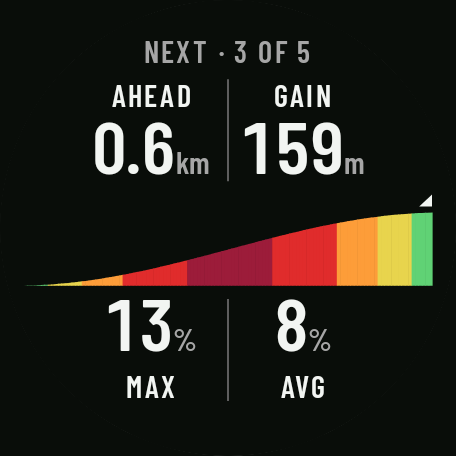
Before the first climb, or between two, NEXT · 3 OF 5: AHEAD, how far you are from it; GAIN, its ascent; MAX, its steepest grade, and AVG, its average grade.
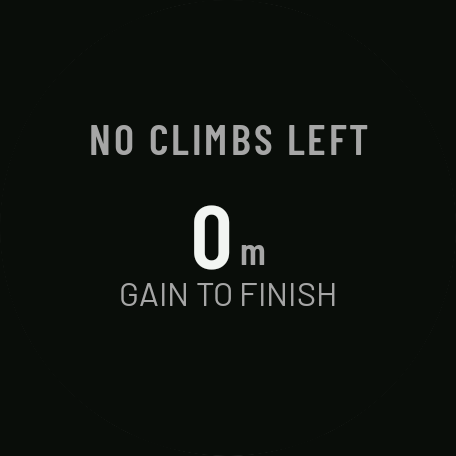
If the route has no climbs, NO CLIMBS; after the last one, NO CLIMBS LEFT. Either way, below it, the ascent left to the end of the route (GAIN TO FINISH).
Distances are in km (or miles), with one decimal under 10 (“9.4 km”) and none from 10 (“18 km”); ascent in meters (or feet), and grades in %. With the Color style, distance is green, ascent purple and grades in the grade color (see Number style). Off route, the numbers show “--” and the dot turns gray where you left the route. With the always-on screen, the profile is a gray line.
What counts as a climb
Climbs come from the route’s profile (the altitudes in the GPX), not from what the watch measures, and they’re worked out when the activity starts. A stretch counts as a climb if it goes up:
- On foot (Running, Trail running, Hiking and Walking): at least 300 m long, 20 m of ascent from the foot to the top and a 4% average grade. A nearly flat stretch of more than 400 m splits it in two.
- On the bike (Cycling, MTB and Gravel): at least 500 m, 30 m of ascent and a 2% average, and long or steep enough as well (length in meters times average grade, 1500 or more: 500 m at 3% or 750 m at 2%, for example). Two climbs with a flat stretch of up to 1 km between them, where you don’t drop more than 10 m, count as one.
If the GPX has no altitudes, there are no climbs.
Adding it
On the phone, in Sports, under Special screens: Add special screen › Climb. It isn’t added by default. On the watch it’s one more page, after your data pages, in the order of Special screens (drag its handle to reorder), and only when you’re following a route: without one, it doesn’t appear. In Strength you can’t add it, because there’s no GPS.
Showing it automatically
Tap its card for Show automatically when a climb starts (on by default, per sport): at the foot of a climb on the route, the watch switches to the Climb page with a short vibration and, once you’re over the top (30 m past it), goes back to the page you were on.
- It doesn’t switch if you’re in Controls or paused: that climb goes without it. Nor if you start the activity, or reach the route, already partway up a climb.
- If a turn or off-route alert is showing at that moment, or you’re swiping between pages, it waits until it’s over.
- If you’ve moved to another page by the time you reach the top, it leaves you there.
- If you go off route partway up, it goes back to the previous page and the off-route alert shows (see Off route). If you rejoin the route before the top, it can switch again.
- With the always-on screen, it changes page without waking the screen.
- It needs the New route follower, which comes on (under Experimental; see Turn alerts): with it off, the page doesn’t show automatically.