Strength
Strength is the sport for training with weights or your own body, without GPS. You can follow a workout of exercises, with its sets and rests, that the watch walks you through, or train without a workout, with your data screens.
Creating a Strength workout
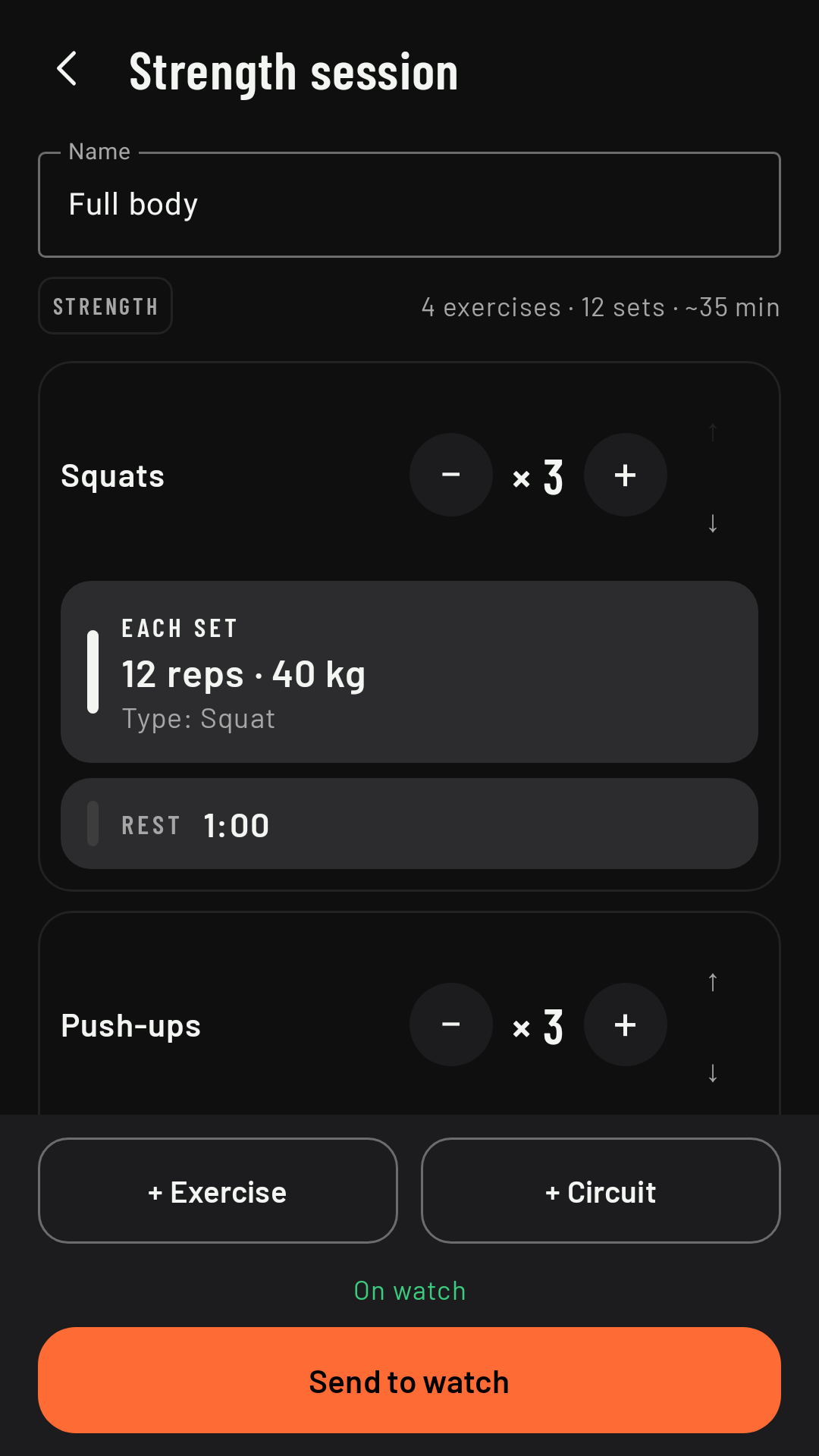
On the phone, Workouts tab, + New workout and, in the New session sheet, Strength. Then you choose where to start from:
- Blank: you add the exercises.
- Full body or 20 min circuit, two examples. A template is copied: what you change is yours and the template stays the same.
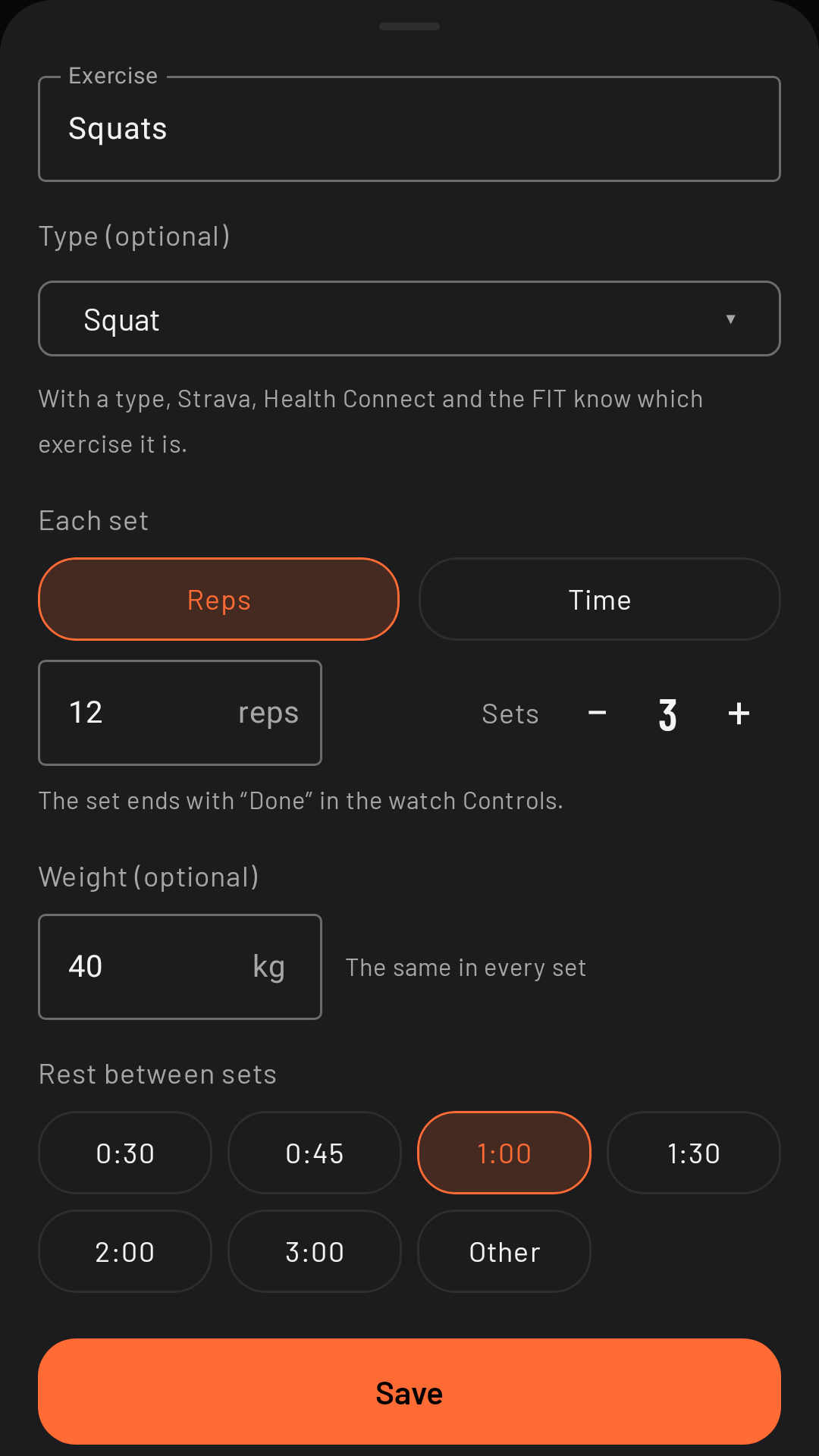
In the editor, + Exercise opens the exercise sheet:
- Name, whatever you like. If it doesn’t fit on the watch, it scrolls once, slowly, when the set or the rest starts, so you can read all of it, and the side where it’s cut off fades out; with the always-on screen it stays still, ending in “…”.
- Type (optional), from a short list: squat, deadlift, bench press, push-ups, plank… With a type, Strava, Health Connect and the FIT file know which exercise it is. If the name is empty, it’s filled in with the type’s (and you can change it); if it already has a name, the type leaves it alone.
- Each set: by reps or by time (min:s), with the weight if you want (the same in every set), and how many sets.
- Rest between sets: 0:30, 0:45, 1:00, 1:30, 2:00, 3:00 or Other, by hand, from 0:05 to 10:00.
+ Circuit groups several exercises done one after another, with their rounds. To change the order, drag each card by its handle, the two lines.
At the top, the editor shows an approximate duration, rounded to 5 minutes (“~35 min”): it counts 5 min of warm-up, a few seconds per rep and per set, the rests and the changes of exercise. It’s an estimate.
When you’re done, Send to watch, as with intervals. If the watch has an older version of the app, the editor tells you: “Update RawPace on the watch to use Strength”. If it can’t ask the watch right now (it’s far away or switched off), it says “Can’t check the watch right now”, without assuming it has an older version.
Starting on the watch
On the home screen, choose Strength (it’s at the end of the sports). In Strength, the home screen doesn’t look for GPS and has no Route or Reminders rows. Intervals lists only your Strength workouts: pick one before you start, or leave it on None to train without a workout. A Strength workout can only be chosen with Strength on the home screen; it doesn’t show up with the other sports. Strength doesn’t ask for your location when it starts.
Without a workout
Without a workout, Strength is a regular activity without GPS: you see your data screens (by default, one with the time at the top, heart rate, calories and the time of day) and, in Controls, Lap marks a lap by hand, for example at the end of each set. There’s no auto lap and no lap summary.
The set
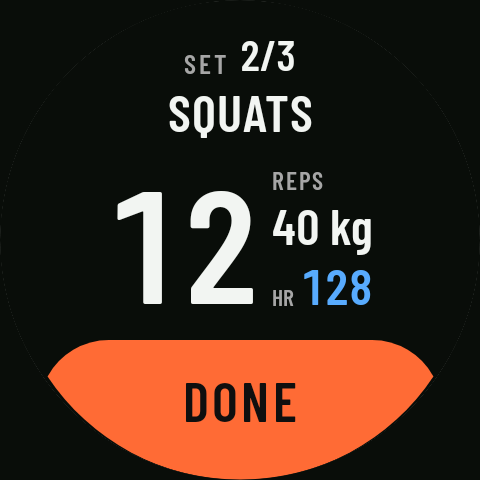
At the top, which set you’re on (“SET 2/3”) and the exercise. Big, the reps (with “REPS”), the weight and your heart rate, in the color of its zone, as on the data pages (in the rest too); in an exercise by time, the countdown of what’s LEFT.
When you finish the set, tap DONE, the big button at the bottom. It doesn’t respond during the first 3 seconds of each set, so you don’t end it by accident. It’s also in Controls: the bottom button says Done. A set by time starts by itself when the rest ends and ends by itself when the time is up; if you cut it short with DONE, what it actually lasted is saved. In its last 10 s the countdown turns amber and the watch vibrates twice.
The rest
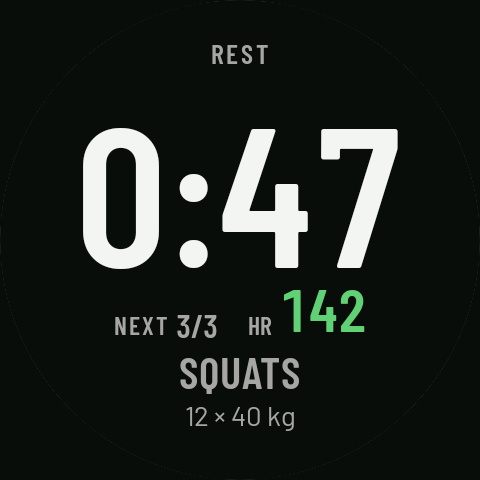
After each set the rest starts: “REST” and the big countdown; below, what’s next (“NEXT 3/3”) with your heart rate, and the coming exercise with its reps and weight. To end it early, Skip in Controls.
In the last 10 s the countdown turns amber and the watch vibrates twice; before the last set too. At the end, a long vibration, different from the others, so you go back to the set without looking. A rest or a set by time of 10 s or less doesn’t get this warning.
Pausing
The physical button pauses, as in the other sports (see Pause). While paused, the set or the rest stays where it was.
Vibration and sound
On the phone, Sports › Strength › Laps: Lap alert vibration and Lap alert sound apply to every Strength alert: when you mark a lap, at the warning in the last 10 s and when a rest or a set ends. By default it vibrates and makes no sound.
Strength settings on the phone
In Sports, Strength is at the end, in a family of its own. It has its own screens (like any sport, but the field picker doesn’t offer the ones that need GPS), the special pages (only HR zones), Laps, Screen (in ambient, Data or Dim data; by default, Dim data) and Buttons and gestures. If the watch has an older version, the phone tells you: Strength’s screens and settings reach it once you update it, and the other sports don’t change. In Settings › You › Default sport you can pick Strength too.
When you finish
The watch summary has the time, the average heart rate, the calories, the sets, the EXERCISES block with what you did and, at the end, the time in each heart rate zone. Without a workout, no sets and no EXERCISES.
On the phone, the activity details (see Activity details) show the average and max heart rate, the calories, the sets (“11 of 12” if you left one undone) and each exercise with its sets, reps and weight, and the actual rest.
The calories are the ones the watch works out (Health Services). In Strength, the activity notification only shows the time.
When it’s uploaded
- Strava: as “Weight Training”, with the exercise breakdown in the description and, since 0.3.4, with the workout’s name as the title, as on Runalyze (“Full body”; without a workout, “Afternoon Strength”).
- Runalyze and Intervals.icu: with the workout’s name as the title (“Full body”; without a workout, “Afternoon Strength”) and the breakdown in the note, before “Recorded with RawPace”.
- Health Connect: as strength training, with every set and every rest (the exercise type and the reps) and the breakdown in the notes. Calories aren’t written to Health Connect.
- The FIT file (also the one you export) has every set and every rest, with the exercise, the reps and the weight, and the calories.
The breakdown is what you did: “Strength · 4 exercises · 11 sets · 38 min”, each exercise with its sets and reps (“Squats 3×12 · 40 kg”) and the rest. Without a workout, the time and that of each lap you mark.
If the phone has an older version of the app, the watch keeps the activity and sends it once the phone is updated (“Will be sent to the phone once it is updated”).
What it doesn’t do yet
- Change the reps or the weight on the watch during the workout: change them on the phone, beforehand.
- End the set with the physical button: the button pauses, as always.
- Reminders, auto lap, map and route profile: Strength doesn’t have them.
- HIIT.